How to convert existing CCTV to AI, without replacing your cameras.
What has to be true, three ways to do it, how to test your streams, and what can go wrong.
The short answer: yes, in most cases. If your cameras or recorder can give a standard video stream on your network (RTSP or ONVIF) and the picture is clear enough, AI software can read it without new cameras. Older analog cameras usually work through a DVR or encoder. What matters most is the view, not the age of the camera.
This guide shows what has to be true, three ways to do it, how to check your own system, what can go wrong, and what a realistic rollout looks like. It is written for site owners, security heads and operations managers, not for engineers. If you would rather have someone look at your cameras, the free camera-readiness check at the end takes three screenshots.
What has to be true: a 10-question checklist
Work through these before you talk to any vendor, including us. Each "no" is not a dead end, but it tells you where the work is.
| # | Question | Why it matters | How to check |
|---|---|---|---|
| 1 | Are your cameras IP cameras, or analog cameras on a DVR? | IP cameras and recorders can share a video stream directly. Analog cameras need the recorder or an encoder to do it. | Look at the camera label and the recorder. A network cable (RJ45) to the camera usually means IP; a coax (BNC) cable means analog. |
| 2 | Can the camera or recorder give an RTSP or ONVIF stream? | This is the standard way software "pulls" video. | Look for RTSP or ONVIF in the recorder's network settings or manual. |
| 3 | Is the stream turned on, and do you have the login? | Many recorders ship with RTSP switched off, or the account lacks rights. | Ask whoever manages the recorder for an admin or viewer account that can open streams. |
| 4 | Does the camera offer a second, lighter stream (a sub-stream)? | Analytics rarely needs the full-quality stream, and a sub-stream saves network load. | Check the camera's video settings for "main stream" and "sub stream". |
| 5 | Is the picture sharp enough at the distance that matters? | AI can only use what the camera can see. | Pause a night and a day frame and zoom in on the area you care about. |
| 6 | What resolution and frame rate does it run at? | Many vendors quote about 1080p and about 10 frames per second as a practical floor. We confirm the exact figures for your cameras during the free check; we do not publish a minimum of our own. | Camera video settings. |
| 7 | Is the view clear at night, in glare and in bad weather? | Infrared, backlight and a dirty lens are the usual reasons AI struggles. | Look at recordings from the worst hours. |
| 8 | Is the lens clean and the camera fixed in place? | A moved or dirty camera changes what the AI sees. | Check physically, and compare today's view with last month's. |
| 9 | Is there a computer on site that can reach the cameras on the local network? | The analysis runs on a computer at your site, not in the cloud. | Confirm network access between the cameras, recorder and a spare port or room for a computer. |
| 10 | Are you allowed to monitor this area for this purpose? | Privacy rules and workplace policy apply to any video use. | Check your policy and local rules; see security and privacy. |
Three ways to add AI to cameras you already own
There is no single right answer. Here are the three real options, fairly compared.
| 1. Software layer on your recorder or VMS | 2. Replace with AI cameras or an AI recorder | 3. An on-site analytics computer reading your streams (the Eye AI approach) | |
|---|---|---|---|
| What you do | Add analytics software that works with your existing video management system | Buy cameras or a recorder with analytics built in | Keep your cameras and recorder; add a computer at your site that reads their video streams |
| Good for | Sites that already run a VMS from the same vendor and like it | New builds, or sites where most cameras are already due for replacement | Sites with many existing cameras of mixed brands that want results without a rebuild |
| Watch out for | Tied to that vendor and its supported cameras | Cost per camera, and every camera needs replacing to get the same coverage | Needs a clear view and a stream; sized to your cameras and analytics after a survey |
| Keeps your cameras | Yes | No | Yes |
| Where video is processed | Depends on the product | In the camera or recorder | On a computer at your site |
When should you not choose option 3? If your cameras cannot give a stream and cannot be put behind a recorder that can, or if the view is too poor to read, new or repositioned cameras may be the honest answer. We would rather tell you that after a check than sell you something that disappoints.
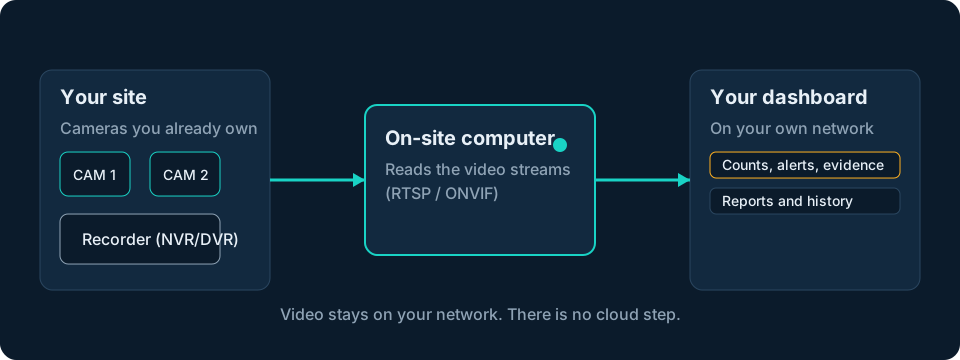
Step 1: find out what you actually have
Most people discover they know less about their cameras than they thought. Spend an hour on this.
- Camera type. IP cameras connect by network cable. Analog HD cameras (AHD, TVI, CVI) use coax and a DVR. Both can work, in different ways.
- Brand and model, for the cameras and for the recorder. The label or the recorder's menu shows it.
- Streams. Most cameras offer a main stream (full quality) and a sub-stream (lighter). Note both.
- Video format. H.264 and H.265 are the common formats. We confirm the format of your streams during the survey.
- Who manages it. You will need an account that can open streams.
If your cameras are analog or older
Analog cameras do not send a network stream themselves. They connect to a DVR (or an encoder), and the DVR can often provide the stream. In practice:
- Check whether your DVR offers RTSP or ONVIF. Many modern ones do, even if the cameras are analog.
- If it does not, a video encoder can convert the analog signal to a network stream.
- The ceiling is the image itself: an old, low-resolution analog picture limits what any AI can read.
We check this on your specific DVR during the survey. We do not claim a tested list of analog set-ups.
A practical tip: you rarely need to retrofit every camera. Pick the five or ten views where a good answer is worth the most (a gate, a restricted door, a yard) and make those work first. If one of them needs a better camera, replace that one.
RTSP and ONVIF in plain words
- RTSP is a standard way for software to open a live video feed from a camera or recorder. Think of it as the address of the video.
- ONVIF is a standard that lets devices from different makers describe themselves and work together. Many cameras support both.
Test a stream yourself
Open a free media player (for example VLC), choose "Open network stream", and paste the camera's RTSP address. If video plays, the stream works. If not, the cause is almost always one of the blockers below.
Typical RTSP addresses
These are common patterns. Always confirm yours in the camera's manual or the vendor's current documentation, and replace the placeholders with your own address and login.
| Brand | Typical pattern (main stream) | Sub-stream |
|---|---|---|
| Hikvision | rtsp://USER:PASSWORD@CAMERA-IP:554/Streaming/Channels/101 |
channel 102 |
| Dahua (and many CP Plus models) | rtsp://USER:PASSWORD@CAMERA-IP:554/cam/realmonitor?channel=1&subtype=0 |
subtype=1 |
| Uniview | rtsp://USER:PASSWORD@CAMERA-IP:554/unicast/c1/s0/live |
s1 |
Common blockers
- RTSP is switched off on the recorder or camera.
- The account has no stream rights, or the password has special characters that need encoding.
- A different port is in use.
- The camera or recorder is on a separate network that the analytics computer cannot reach.
- The sub-stream is disabled.
Is the picture good enough?
This is the question that decides most projects, and it has little to do with how new the camera is.
Pixels on target matters most. A 4K camera far from the action may put fewer pixels on a person than a closer 1080p camera. What counts is how many pixels land on the thing you care about.
| A view that works | A view that struggles |
|---|---|
| Side or slightly elevated angle on the line or area | Looking straight down a lane, or straight at the camera |
| Subject large enough in the frame | Subject tiny or far away |
| Even light, or good infrared at night | Strong backlight, headlight glare, heavy shadow |
| Clean lens, fixed mount | Dirt, spiders, a camera that has drifted |
| People and vehicles seen separately | Crowds where people overlap heavily |
If you are unsure, send three screenshots (day, night, and the busiest moment) for a free camera-readiness check, and we will tell you honestly what is realistic. See how Eye AI works on your existing cameras.
Network and where the AI runs
You have two broad choices for where the analysis happens.
| On a computer at your site | In the cloud | |
|---|---|---|
| Video leaves your network | No | Yes |
| Needs a strong internet link | No | Yes, and the upload cost |
| Keeps working if the internet drops | Yes | Usually not |
| Privacy | Video stays with you | Depends on the provider |
Eye AI processes video on a computer at your site, and the dashboard is password-protected on your network. Read more in security and privacy.
Good practice is to use sub-streams for analytics, keep the analytics traffic on your local network, and keep the cameras on a separate, secured network segment from the office network.
The network and computer are sized after a survey of your cameras and the analytics you choose; we do not publish a rule of thumb.
What can go wrong (and what to do about it)
No honest guide skips this part. Here is what limits any AI video analytics, including ours:
- Night and distance. Small or far objects at night can be missed or merged.
- Hidden people and vehicles. Someone half-hidden behind another person may not be counted separately.
- Glare, rain and dirt. Headlights, wet lenses and dirty glass reduce accuracy.
- A camera that moves or fails. If the view changes, the lines and areas you drew may no longer match.
- Dropped streams. A recorder reboot or network fault can blind a camera without anyone noticing.
How we handle it, in plain terms:
- A safety net flags movement the AI cannot name, so a possible miss is not left unseen.
- A stream health record shows exactly when a camera went blind and for how long, so you have proof of when the system was and was not watching.
- A public page on what AI video analytics cannot do.
We publish no accuracy figure yet. We will share one only after measuring it on validation footage, with the conditions stated. Treat any vendor's single accuracy number, ours included, with caution until you have seen it on your own cameras.
A realistic rollout
A sensible sequence for any vendor:
- Check. A free camera-readiness check from screenshots, then a survey of your cameras, network and site.
- Connect. Add the camera streams and the on-site computer.
- Mark what matters. Draw lines and areas on a picture from your own camera: a gate line, a restricted area, a parking area.
- Tune and review. Compare what the system logs with what actually happened, and adjust.
- Go live, then review the events and reports regularly.
We usually start with a pilot on a few cameras, scoped to your requirements: the number of cameras, the duration, and how success is checked on your own footage, agreed before anything starts.
Set-up and pilot length are scoped per site, so we do not quote a standard duration.
What it costs
We do not publish prices yet because every site is different, but the structure is simple, so there are no surprises. A quote is built from:
- A yearly analytics licence, priced per camera and per analytic. You pay only for the analytics you switch on, on the cameras that need them.
- An on-site computer, one-time, sized to your cameras and analytics (buy, lease or bundle).
- Installation and set-up, one-time, after a survey.
- Support and updates, yearly.
What moves the price: the number of cameras, which analytics run on which camera, how heavy those analytics are, the computer size, site complexity and contract length. Retrofitting is usually cheaper than replacing every camera, because you keep the cameras you own. See how Eye AI is priced.
Frequently asked questions
Can I add AI to my existing CCTV? In most cases, yes. If your cameras or recorder provide a standard video stream (RTSP or ONVIF) on your network and the picture is clear enough, AI software can read it without new cameras. A free check from three screenshots tells you before you spend anything.
Do I need to buy new cameras? Usually not. New or repositioned cameras are only needed where the view is too poor to read or where a camera cannot give a stream.
Can analog cameras work with AI video analytics? Often, through a DVR or encoder that provides a network stream. The picture quality then limits what the AI can see. We check each DVR in the survey.
What are RTSP and ONVIF, and why do they matter? RTSP is a standard way to open a live video feed; ONVIF lets devices from different makers work together. They are how analytics software reaches your cameras.
Will it work with my Hikvision or Dahua recorder? Most recorders from these and similar brands can provide RTSP streams. The only way to be sure is to test your model. We test your recorder model during the survey.
Does AI video analytics need an internet connection? Not for the analysis. Eye AI processes video on a computer at your site. You only need a connection if you choose remote access or alerts that leave your network.
Does it replace my NVR or VMS? No. It sits alongside them and uses their video. Your recorder keeps recording as before.
Does it slow down my network? It adds the load of reading the streams you choose. Using sub-streams and keeping the analytics traffic on your local network keeps the impact low. We size this after the survey.
How accurate is it? It depends on the view: distance, light, angle and how crowded the scene is. We publish no accuracy figure yet and will share one only after measuring it on validation footage, with the conditions. Check it on your own cameras in a pilot.
Is my video sent to the cloud? No. Video is processed on a computer at your site, and the dashboard is password-protected on your network.
Next step
Not sure your cameras are good enough? Send three screenshots (day, night and the busiest moment) for a free camera-readiness check. Or request a solution and tell us about your site and what you want to see or solve. We reply within 24 to 48 hours on working days.
You may also like: every Eye AI analytic and its honest status, try the playground, and questions answered.
Sources and further reading
- ONVIF, the open standard for network video
- RTSP, the Real Time Streaming Protocol (IETF RFC 2326)
- Your camera or recorder maker's current documentation for stream addresses (Hikvision, Dahua, Uniview and others).
Tell us what you need.
We read every request and reply within 24–48 hours (working days, Monday to Friday) with questions and a proposed solution.
Request a solution